
 40G/100G Optical Transceivers
 25G Optical Transceivers
 10G Optical Transceivers
 155M/2.5G Optical Transceivers
 1G Optical Transceivers
 1G BIDI Optical Transceivers
 Dual-Rate Optical Transceivers
 FC 16G/32G Optical Transceivers
 CWDM Optical Transceivers
 DWDM Optical Transceivers
 SGMII Port Optical Transceivers
 XFP Optical Transceivers
 100M/1G/10G Coppers
 Full-Rate AOC & Breakout Series
 10G/40G Active DAC Series
 Full-Rate Passive DAC Series
 40G/100G Passive Breakout DAC Series
 Regular/MTP-MPO Fiber Patch Cords
 MT2011
 MT2010
 CodingBox
 QSFP to SFP Adapter
How To Switch Optical/Electrical Mode On Huawei Router Combo Ports
Time: 2024-08-23
A Combo port, also known as an optical-electrical multiplexing port, consists of one optical port and one electrical port on the device panel, which share a single internal forwarding channel. The Combo electrical port and its corresponding optical port are logically multiplexed. Users can choose either port according to actual networking requirements, but the two cannot operate at the same time.
This article takes the Huawei AR5710S-S8T2X router as an example to explain how to switch the optical and electrical modes of Combo ports.
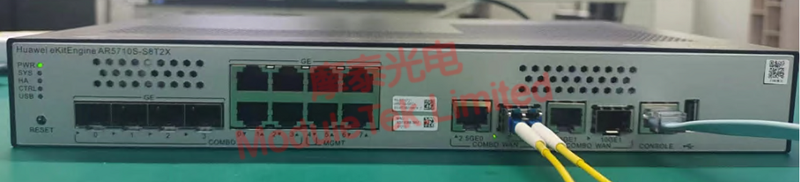
Figure 1 Schematic Diagram of Optical Transceiver Connection
1. GE Combo Port
By default, the GE Combo port works in electrical mode.
Enter the interface view and run the following commands:
• Switch to optical mode:
combo enable fiber
• Restore default electrical mode:
undo combo enable fiber
After switching the interface to optical mode, the GE SFP transceiver can work normally. For related commands, please refer to the article: How To View Optical Transceiver Information On Huawei Switches.
Note: The Combo optical port is disabled by default. Only after switching to optical mode with the above command can the GE SFP transceiver be used properly.
2. 10GE Optical / 2.5GE Electrical Combo Port
This type of Combo port defaults to 2.5GE electrical mode. Enter the global configuration view and run the switching commands below:
• Switch to 10GE optical mode:
port combination-mode 10GE interface <interface-name>
• Restore default 2.5GE electrical mode:
undo port combination-mode 10GE interface <interface-name>
Note: <interface-name> indicates the port number. You can view interface information by using the command:
display interface brief
After switching to 10GE optical mode, the 10G SFP+ transceiver can operate normally.
Note: The 10GE optical port is disabled by default. It must be enabled by mode switching command to support 10GE SFP+ transceivers.
Moduletek offers a full range of optical transceivers compatible with Huawei switches and routers, featuring stable compatibility and reliable performance. Welcome to consult and purchase.
For further inquiries about the above content, please contact us at: sales@moduletek.com






