
 40G/100G Optical Transceivers
 25G Optical Transceivers
 10G Optical Transceivers
 155M/2.5G Optical Transceivers
 1G Optical Transceivers
 1G BIDI Optical Transceivers
 Dual-Rate Optical Transceivers
 FC 16G/32G Optical Transceivers
 CWDM Optical Transceivers
 DWDM Optical Transceivers
 SGMII Port Optical Transceivers
 XFP Optical Transceivers
 100M/1G/10G Coppers
 Full-Rate AOC & Breakout Series
 10G/40G Active DAC Series
 Full-Rate Passive DAC Series
 40G/100G Passive Breakout DAC Series
 Regular/MTP-MPO Fiber Patch Cords
 MT2011
 MT2010
 CodingBox
 QSFP to SFP Adapter
Nokia Switch SR Linux System Basic Operation
Time: 2024-12-12
We previously introduced the common interface configuration of Nokia SR OS System Common Interface Configuration. Recently, Moduletek Laboratory purchased a Nokia 7220 IXR-D4 router and found it runs on the SR Linux system, which is different from the SR OS system installed on the Nokia 7250 IXR. Next, we will walk you through the basic operations of SR Linux.
The Nokia 7220 IXR-D series are high-performance, fixed-configuration platforms designed for data center leaf-spine deployments, powered by the new SR Linux network operating system. The Nokia 7220 IXR-D4 is equipped with 28 × 100G QSFP28 interfaces and 8 × 400G QSFPDD interfaces.
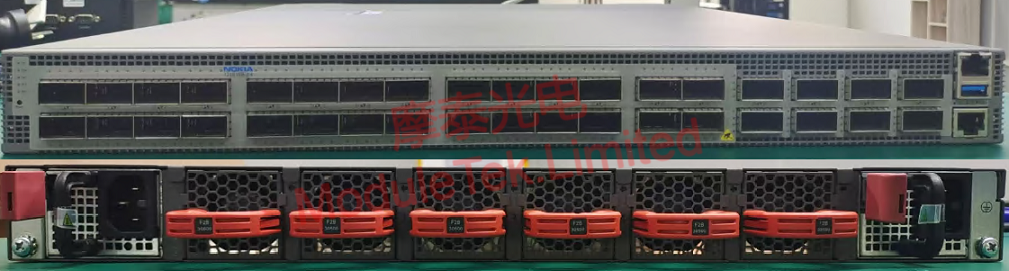
Figure 1 Device Appearance
Connect a PC to the device’s console port using an RJ45-to-DB9 serial cable. The device’s default parameters are as follows:
• Default baud rate: 115200
• Default username: linuxadmin
• Default password: NokiaSrl1!
After logging into the console, you will enter the SR Linux directory. Run the command to access the CLI (Command Line Interface):
sr_cli
Before entering the CLI for the first time, you need to disable the ZTP (Zero Touch Provisioning) autoboot function. Execute the command:
ztp service stop --autoboot disable
The device will automatically reboot after this command is executed.
After the device reboots and you re-enter the CLI, run the command to view all interfaces:
show interface all
You will find that all interfaces are administratively down by default and need to be manually enabled before use.
Run the following command to enter configuration mode:
enter candidate
Then execute the command to enable or disable the target interface:
set interface <port_number> admin-state enable/disable
Insert Moduletek’s QSFP-100G-CWDM4 optical module into the Nokia 7220 IXR-D4 router, connect the fiber patch cords, and execute the command to check the interface speed and status:
show interface <port_number> detail
The module can normally negotiate to the 100G rate, the module model is correctly identified, and DOM data is read without any abnormalities.
Note:
a. <port_number> refers to the physical interface number. You can run the following command to query all interface numbers:
show port all
b. All configurations must be committed and saved to take effect permanently:
commit save
Moduletek Limited is at your service.
For further inquiries about the above content, please contact us at: sales@moduletek.com






