
 40G/100G Optical Transceivers
 25G Optical Transceivers
 10G Optical Transceivers
 155M/2.5G Optical Transceivers
 1G Optical Transceivers
 1G BIDI Optical Transceivers
 Dual-Rate Optical Transceivers
 FC 16G/32G Optical Transceivers
 CWDM Optical Transceivers
 DWDM Optical Transceivers
 SGMII Port Optical Transceivers
 XFP Optical Transceivers
 100M/1G/10G Coppers
 Full-Rate AOC & Breakout Series
 10G/40G Active DAC Series
 Full-Rate Passive DAC Series
 40G/100G Passive Breakout DAC Series
 Regular/MTP-MPO Fiber Patch Cords
 MT2011
 MT2010
 CodingBox
 QSFP to SFP Adapter
Methods For Distinguishing Optical Module Types
Time: 2019-05-06
If you have purchased optical modules from multiple manufacturers and encountered material mixing, how can you distinguish their types? Optical modules are usually affixed with labels covering information such as manufacturer, production date, module type, transmission distance, and serial number to help customers identify them. But what if the information on these labels is damaged or lost due to high temperature, humidity, or other factors? As the number of optical module manufacturers and customer options continues to grow, and with the increasing transparency of business transactions, more and more procurement needs are fulfilled through public bidding. Winning bidders supply corresponding modules in a certain proportion, which increases the possibility of confusion at the application end. How should we distinguish them then?
Regarding all the dimensions of optical module housings, the current MSA (Multi-Source Agreement) only specifies certain core dimensions—for example, those related to unlocking and insertion depth. Therefore, the housings of optical modules from different manufacturers are inconsistent: some use self-designed housings, while others adopt popular universal housings available on the market. It is not feasible to distinguish module types solely by their housing appearance.
So, how to easily identify optical module types? You can distinguish them from the following details:
1. Distinguish by the Color of Module Pull Tabs
For modules with distinctly different pull tab colors, you can preliminarily identify their types based on relevant industry standards. Table 1 lists part of the pull tab color standards defined in the new version of the Multi-Source Agreement, and Table 2 shows the pull tab colors corresponding to common Cisco 40G models.
Table 1 Partial Pull Tab Color Standards
|
Standard Source
|
Applicable Type
|
Pull Tab Color
|
Example Transceivers
|
|
SFF-8679 Revision 1.8
|
QSFP 40G 4×850KM
|
Beide
|
40G SR4、100G SR4
|
|
QSFP 40G 4×1310KM
|
Blue
|
40G LR4、100G LR4
|
|
|
QSFP 40G 4×1550KM
|
White
|
|
|
|
CWDM4 MSA Technical Specifications Rev 1.1
|
100G CWDM4 2KM
|
Green
|
100G CWDM4 2KM
|
Table 2 Pull Tab Color List for Partial Cisco 40G Modules
|
Type of Cisco
|
Pull Tab Color
|
|
Cisco QSFP-40G-SR4-S
|
Beige
|
|
Cisco QSFP-40G-LR4-S
|
Blue
|
|
Cisco QSFP-40G-SR4-BD
|
Gray
|
|
QSFP-40G-CSR-S
|
Orange
|
|
FET-40G
|
Brown
|
|
QSFP-40G-LR4
|
Blue
|
|
QSFP-40G-ER4
|
Red
|
2. Distinguish by the Text on Pull Tabs
In addition to color, some suppliers also print text markings on pull tabs. For example, the pull tabs of Cisco modules bear the CISCO logo, and those of some manufacturers are marked with transmission rates.
3. Distinguish by Encoding Data
Reading the internal encoding data of optical modules requires the use of supporting devices such as switches or dedicated code readers. The data written in the encoding area of optical modules is strictly defined. For instance, our company’s code reader can read and analyze the meaning of encoding data in SFP/XFP/QSFP modules.
Taking the QSFP-LR4 application as an example: after clicking the Read Table button, the internal encoding data of the module is displayed on the interface. The corresponding codes are interpreted in the Explain sub-interface. Based on Figures 2–4, we can obtain the following information about the module: QSFP+ package, power consumption rating of 3.5W, dual LC connectors, transmission rate of 10.3G, transmission distance of 10km, non-cooled laser, manufacturer as MODULETEK, type as QSFP-LR4-10KM, wavelength of 1310nm (actually, based on MSA, the wavelengths of the four channels are 1271/1291/1311/1331nm respectively), serial number as PJE00041, and production date as February 29, 2020.
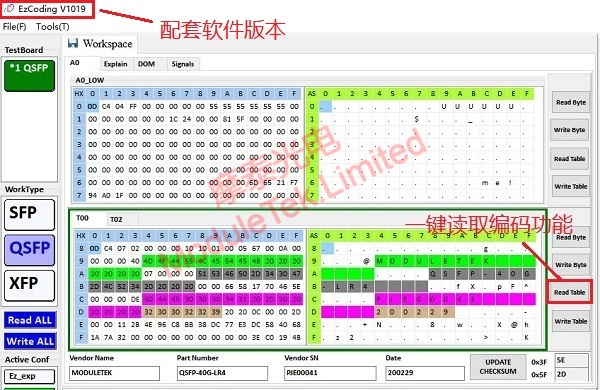
Figure 1 Reading Encoding
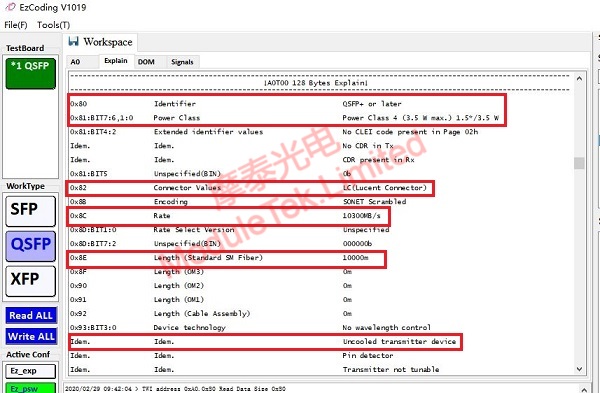
Figure 2 Decoding Part 01
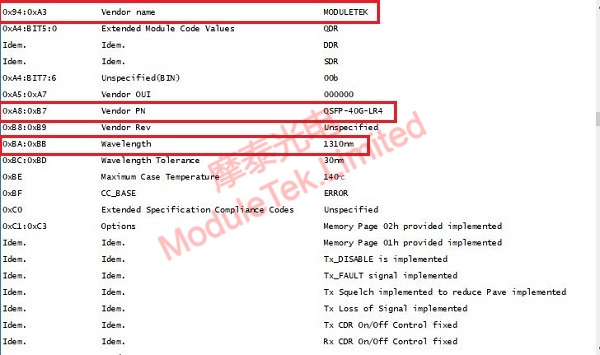
Figure 3 Decoding Part 02
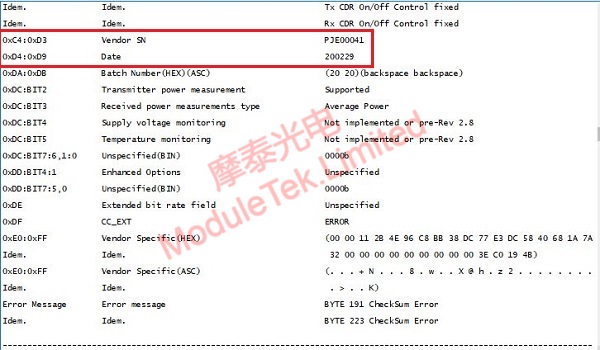
Figure 4 Decoding Part 03
Moduletek provides code readers applicable to SFP/XFP/QSFP packages, which can automatically identify the type of inserted modules and interpret module encoding information with one click. Welcome to contact us for product inquiries and orders.
For further inquiries about the above content, please contact us at: sales@moduletek.com






