
 40G/100G Optical Transceivers
 25G Optical Transceivers
 10G Optical Transceivers
 155M/2.5G Optical Transceivers
 1G Optical Transceivers
 1G BIDI Optical Transceivers
 Dual-Rate Optical Transceivers
 FC 16G/32G Optical Transceivers
 CWDM Optical Transceivers
 DWDM Optical Transceivers
 SGMII Port Optical Transceivers
 XFP Optical Transceivers
 100M/1G/10G Coppers
 Full-Rate AOC & Breakout Series
 10G/40G Active DAC Series
 Full-Rate Passive DAC Series
 40G/100G Passive Breakout DAC Series
 Regular/MTP-MPO Fiber Patch Cords
 MT2011
 MT2010
 CodingBox
 QSFP to SFP Adapter
Summary Of Common Switch Compatibility CommAnds (II)
Time: 2020-02-23
This article continues to introduce common switch compatibility commands. (Note: "[interface-id]" in the following text refers to the port number of the switch where the module is inserted.)
1. HP-Aruba
Taking the HP-Aruba 8320 (JL479A) switch as an example, its compatibility commands are as follows:
① Link Status: show interface brief
② Transceiver Identification: show interface transceiver
③ DOM Diagnostics: show interface transceiver detail
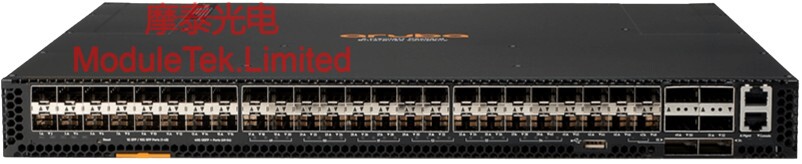
Figure 1 HP-Aruba 8320 (JL479A) Switch
2. Dell
Taking the Dell Z9100-ON switch as an example, its compatibility commands are as follows:
① Link Status: show interfaces [interface-id]
② Transceiver Identification: show inventory media

Figure 2 Dell Z9100-ON Switch
3. IBM-Blade
Taking the IBM-Blade G8264 switch as an example, its compatibility commands are as follows:
① Link Status: show interface status
② Transceiver Identification: show interface transceiver
③ DOM Diagnostics: show interface transceiver

Figure 3 IBM-Blade G8264 Switch
4. Ciena
Taking the Ciena 3960 switch as an example, its compatibility commands are as follows:
① Link Status: port show
② Transceiver Identification: port xcvr show
③ DOM Diagnostics: port xcvr show

Figure 4 Ciena 3960 Switch
5. Mellanox
Taking the Mellanox SN2410 switch as an example, its compatibility commands are as follows:
① Link Status: show interface status
② Transceiver Identification: show interface [interface-id] transceiver
③ DOM Diagnostics: show interface [interface-id] transceiver diagnostics

Figure 5 Mellanox SN2410 Switch
6. AVAYA
Taking the AVAYA VSP-8284XSQ switch as an example, its compatibility commands are as follows:
① Link Status: show interfaces GigabitEthernet state [interface-id]
② Transceiver Identification: show pluggable-optical-modules detail
③ DOM Diagnostics: show pluggable-optical-modules detail
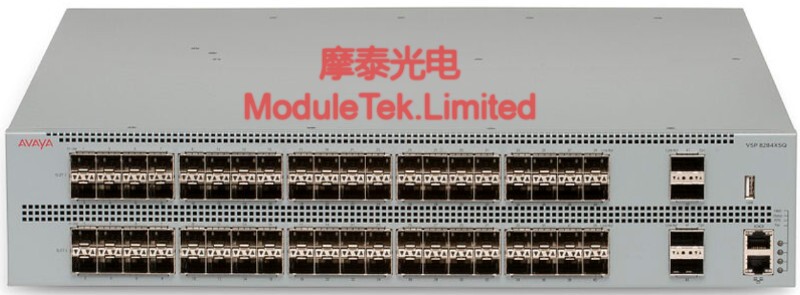
Figure 6 AVAYA VSP-8284XSQ Switch
7. Raisecom
Taking the Raisecom ISCOM2624GF-4C-HI-AC switch as an example, its compatibility commands are as follows:
① Link Status: show interfaces [interface-id]
② Transceiver Identification: show transceiver information [interface-id]
③ DOM Diagnostics: show transceiver ddm [interface-id]

Figure 7 Raisecom ISCOM2624GF-4C-HI-AC Switch
8. Centec
Taking the Centec E580-48X2Q4Z switch as an example, its compatibility commands are as follows:
① Link Status: show interfaces status
② Transceiver Identification: show transceiver [interface-id] detail
③ DOM Diagnostics: show transceiver [interface-id] detail
9. TP-LINK
Taking the TP-LINK TL-SG6428Q switch as an example, its compatibility command is as follows:
① Link Status: show interface status
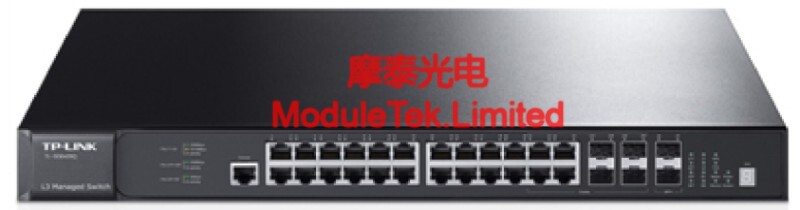
Figure 8 TP-LINK TL-SG6428Q Switch
Moduletek is equipped with all the above-mentioned switches, and all modules will undergo compatibility testing on these switches before delivery. We will continue to compile compatibility commands for switches from other vendors in future releases.
For further inquiries about the above content, please contact us at: sales@moduletek.com






