
 40G/100G Optical Transceivers
 25G Optical Transceivers
 10G Optical Transceivers
 155M/2.5G Optical Transceivers
 1G Optical Transceivers
 1G BIDI Optical Transceivers
 Dual-Rate Optical Transceivers
 FC 16G/32G Optical Transceivers
 CWDM Optical Transceivers
 DWDM Optical Transceivers
 SGMII Port Optical Transceivers
 XFP Optical Transceivers
 100M/1G/10G Coppers
 Full-Rate AOC & Breakout Series
 10G/40G Active DAC Series
 Full-Rate Passive DAC Series
 40G/100G Passive Breakout DAC Series
 Regular/MTP-MPO Fiber Patch Cords
 MT2011
 MT2010
 CodingBox
 QSFP to SFP Adapter
 首页 > Home > Application Notes > Guidelines For Upgrading Brocade G610 Switch System Versions Using FTP
Guidelines For Upgrading Brocade G610 Switch System Versions Using FTP
Time: 2023-06-29
I. Required Tools and Environment
1. FTP server software: FileZilla Server 0.9.60.2 is used in this guide
2. Brocade G610 switch firmware (v9.0.0a)
3. Ethernet cable & Console cable
4. Brocade G610 switch & PC
II. Upgrade Steps
1. Install the FTP server software on the PC, and configure the user account and root directory for file transfer.
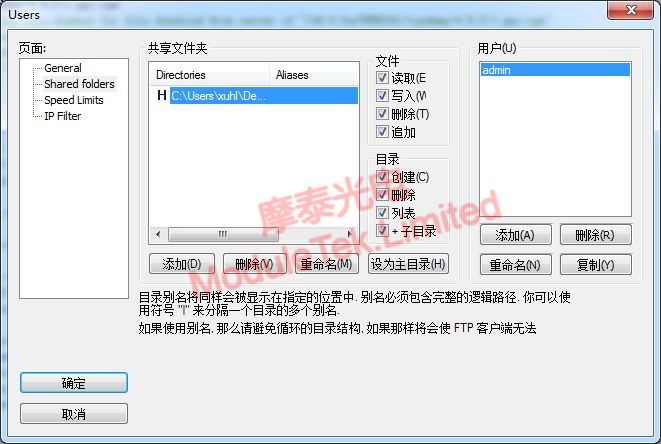
Figure 1 FTP Server Configuration
2. Check the IP address and subnet mask of the G610 switch, then set a compatible IP address and subnet mask on the PC.
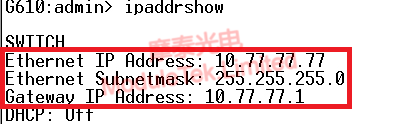
Figure 2 PC IP Address and Subnet Mask Configuration
3. In the terminal emulator, run the following command to start the firmware download:
firmwaredownload -s
Follow the prompts to enter the parameters in sequence:
PC IP address: 10.77.77.7
FTP username: admin (configured in FileZilla)
Firmware file name: v9.0.0a
Transfer mode: 2 (FTP)
FTP password: Set in your FileZilla configuration
Confirm the download when prompted.
Figure 3 Firmware Download Completed
4. After the progress finishes, the firmware has been successfully transferred to the switch.
You can verify the downloaded firmware version afterward.
5. Run the following command to perform the upgrade:
firmwaredownload -s
This command executes a single-partition firmware upgrade and does not automatically reboot the switch.
You must manually reboot the switch. During the reboot countdown, press 3 to access the BIOS interface and configure the boot partition.
After the switch restarts, verify that the system primary boot partition has been updated to v9.0.0a.
III. Upgrade Result
Firmware version before upgrade: (displayed on the switch)
Firmware version after upgrade: v9.0.0a
Moduletek provides FC optical modules compatible with Brocade switches, including FC16G, FC32G and other rates. Welcome to purchase!
For further inquiries about the above content, please contact us at: sales@moduletek.com






