
 40G/100G Optical Transceivers
 25G Optical Transceivers
 10G Optical Transceivers
 155M/2.5G Optical Transceivers
 1G Optical Transceivers
 1G BIDI Optical Transceivers
 Dual-Rate Optical Transceivers
 FC 16G/32G Optical Transceivers
 CWDM Optical Transceivers
 DWDM Optical Transceivers
 SGMII Port Optical Transceivers
 XFP Optical Transceivers
 100M/1G/10G Coppers
 Full-Rate AOC & Breakout Series
 10G/40G Active DAC Series
 Full-Rate Passive DAC Series
 40G/100G Passive Breakout DAC Series
 Regular/MTP-MPO Fiber Patch Cords
 MT2011
 MT2010
 CodingBox
 QSFP to SFP Adapter
 首页 > Home > Application Notes > How To View Port Status And Optical Module Information On Avaya Switches
How To View Port Status And Optical Module Information On Avaya Switches
Time: 2024-01-03
Reading internal transceiver parameters helps monitor link status, optical power, temperature and coding compatibility between modules and switches. We use Moduletek SFP-10G-BIDI transceiver on Avaya VSP-8284XSQ switch to show detailed query steps.
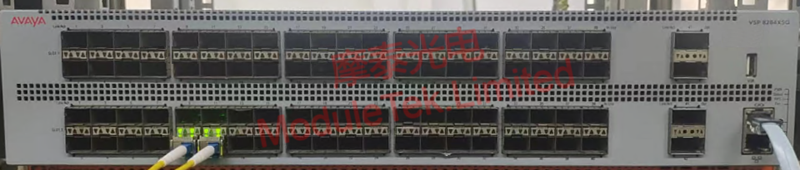
Figure 1 Schematic of Transceiver Connected to Switch
1. Transceiver Link Status
Run command
show interfaces gigabitEthernet name <port number>
It displays port speed, duplex mode, transceiver type and link status. Status UP means the transceiver works properly.
Note: <port number> stands for slot and port ID.
You can run command
show interface gigabitEthernet state
to find it. Omitting parameters will show all port data.
2. Transceiver Identification & DDM Diagnostic Information
Run command
show pluggable-optical-modules detail <port number>
It shows transceiver identification and digital diagnostic data at the same time.
The data includes two parts: module type, model, manufacturer, serial number, wavelength and other identity information. Avaya in Vendor field means official certified module. The other part contains real-time DDM values and thresholds. Normal status indicates all parameters are normal, so you can judge operation status of transceivers on both sides.
Moduletek provides a full range of transceivers compatible with Avaya switches. Welcome to inquire and purchase.
Moduletek Limited is at your service.
For further inquiries about the above content, please contact us at: sales@moduletek.com






