
 40G/100G Optical Transceivers
 25G Optical Transceivers
 10G Optical Transceivers
 155M/2.5G Optical Transceivers
 1G Optical Transceivers
 1G BIDI Optical Transceivers
 Dual-Rate Optical Transceivers
 FC 16G/32G Optical Transceivers
 CWDM Optical Transceivers
 DWDM Optical Transceivers
 SGMII Port Optical Transceivers
 XFP Optical Transceivers
 100M/1G/10G Coppers
 Full-Rate AOC & Breakout Series
 10G/40G Active DAC Series
 Full-Rate Passive DAC Series
 40G/100G Passive Breakout DAC Series
 Regular/MTP-MPO Fiber Patch Cords
 MT2011
 MT2010
 CodingBox
 QSFP to SFP Adapter
Unboxing of Aruba 6300M JL662A Switch
Time: 2024-01-11
Aruba, an American network equipment and solution provider, is a world-leading manufacturer of enterprise wireless network products, focusing on enterprise-level Wireless Local Area Networks (WLAN) and network security. Founded in 2002, Aruba entered China in 2006 and successfully listed on the Nasdaq Stock Market in March 2007.
Moduletek Laboratory purchased one ARUBA 6300M JL662A switch, which can be used to test the 50G SFP product series. Below is a detailed unboxing and acceptance process for everyone.
Table 1 Official Device Description Information
|
Aruba 6300M 24-port 1GbE Class 4 PoE and 4-port SFP56 Switch (JL662A)
|
|
|
Description
|
24x ports 10/100/1000 BaseT PoE+ports supporting up to 30W per port
4x1G/10G/25G/50G1 SFP ports Supports PoE Standards IEEE 802.3af,802.3a
1x USB-C Console Port
1x OOBM port
1x USB Type A Host port
1x Bluetooth dongle for use with CX Mobile App
|
|
Power supplies
|
2 field-replaceable,hot-swappable power supply slots
1 minimum power supply required (ordered separately)
Supported PSUs
JL086A
JL087A
JL670A
Max PoE Power:720W
|
|
Fans
|
Switch has two fan tray slots and comes with one fan tray installed.
• Min 1 fan tray required.
Optional second fan tray ordered separately.
• Fan trays are field replaceable and hot-swappable.
• Each fan tray contains two fans.
|
|
50G capability is for use with 50G DACs for both interconnect and VSF stacking.50G SR transceivers
have been added with a minimum software of10.09.1010.VSF stacking not supported on 1G ports.
|
|
The unboxed device includes one host (without power supply installed). The accessories include a pack of screws, rack angle irons, a USB Bluetooth adapter, and a manual—no power cord or console cable is included. The front panel mainly has 24 RJ45 ports, 4 SFP ports, one USB-C console port, and one MGMT network management port (MGMT: Management); the rear panel has two external power supply slots (no power module installed) and two external fan slots, with one fan module included.
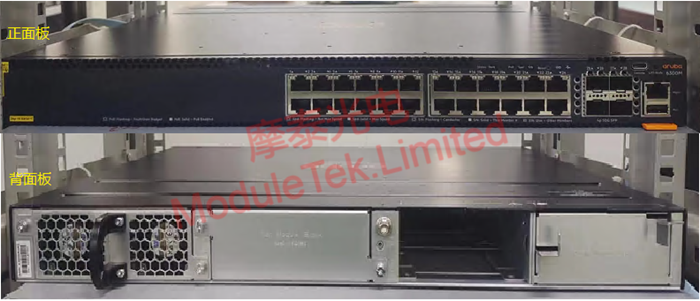
Figure 1 JL662A Host Display
According to the model provided in the official data sheet, the JL086A power supply module (recessed interface) was purchased, with one power cord included.
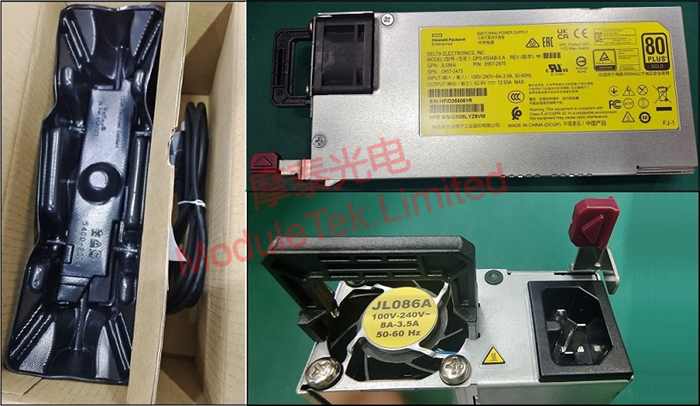
Figure 2 JL086A Power Supply
The JL086A power supply was installed into the JL662A host, and the power cord was connected to power on the device.
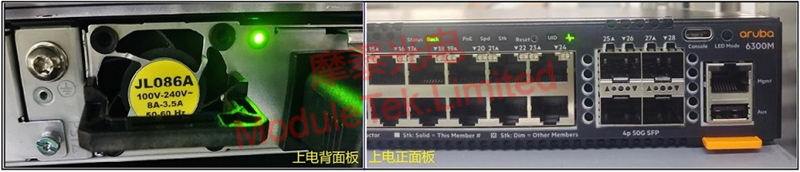
Figure 3 JL662A Device Power-On
Use a USB-C to USB-A data cable to connect the JL662A switch to the PC. A USB-to-serial driver may need to be installed on the host (the driver used in this test is CP2102) to connect to the switch via the serial port. The default baud rate of the device is 115200, and both the username and password are "admin". Log in to the console and execute the command "show system" to check the device model and system version information.
Moduletek's 1G/10G optical modules are fully compatible with Aruba's related devices. Welcome to inquire and purchase.
For further inquiries about the above content, please contact us at: sales@moduletek.com






