
 40G/100G Optical Transceivers
 25G Optical Transceivers
 10G Optical Transceivers
 155M/2.5G Optical Transceivers
 1G Optical Transceivers
 1G BIDI Optical Transceivers
 Dual-Rate Optical Transceivers
 FC 16G/32G Optical Transceivers
 CWDM Optical Transceivers
 DWDM Optical Transceivers
 SGMII Port Optical Transceivers
 XFP Optical Transceivers
 100M/1G/10G Coppers
 Full-Rate AOC & Breakout Series
 10G/40G Active DAC Series
 Full-Rate Passive DAC Series
 40G/100G Passive Breakout DAC Series
 Regular/MTP-MPO Fiber Patch Cords
 MT2011
 MT2010
 CodingBox
 QSFP to SFP Adapter
Juniper QFX Series Switch System Upgrade Guide
Time: 2024-06-24
Juniper switches running the Junos operating system support system upgrades via USB and FTP, which require different firmware packages: image files for USB upgrades and tgz compressed packages for FTP upgrades.
This document demonstrates how to upgrade the system software version of Juniper QFX series switches using an FTP server with a specific case.
Table 1 Parameter Description
| Item | Description |
| Switch Model | Juniper QFX5200-48Y |
| Load system file name | jinstall-host-qfx-5e-x86-64-21.4R3-S3.4-secure-signed.tgz |
| Switch management port ip | 192.168.1.6 |
| FTP server ip | 192.168.1.74 |
| FTP user name | lab |
| FTP user password | admin123 |
Note: Official system software download link: https://support.juniper.net/support/downloads;
Upgrade Steps
1. Set up the super user, set its password and access service type, and configure the em0 interface ip address.
2. Log in to the FTP server client using the configured local account (Tripper FTP is used in this example).
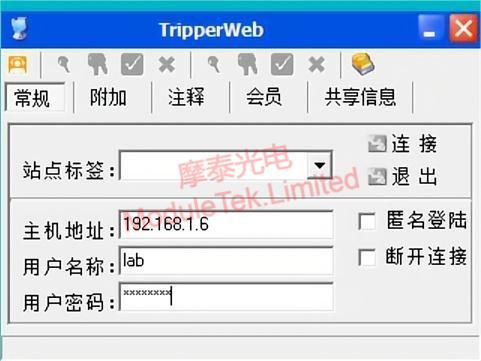
Figure 1 Login to FTP Server
3. Select the local system firmware file on the FTP server, right-click to upload it, and the file will be sent to the switch’s specified directory /var/tmp.
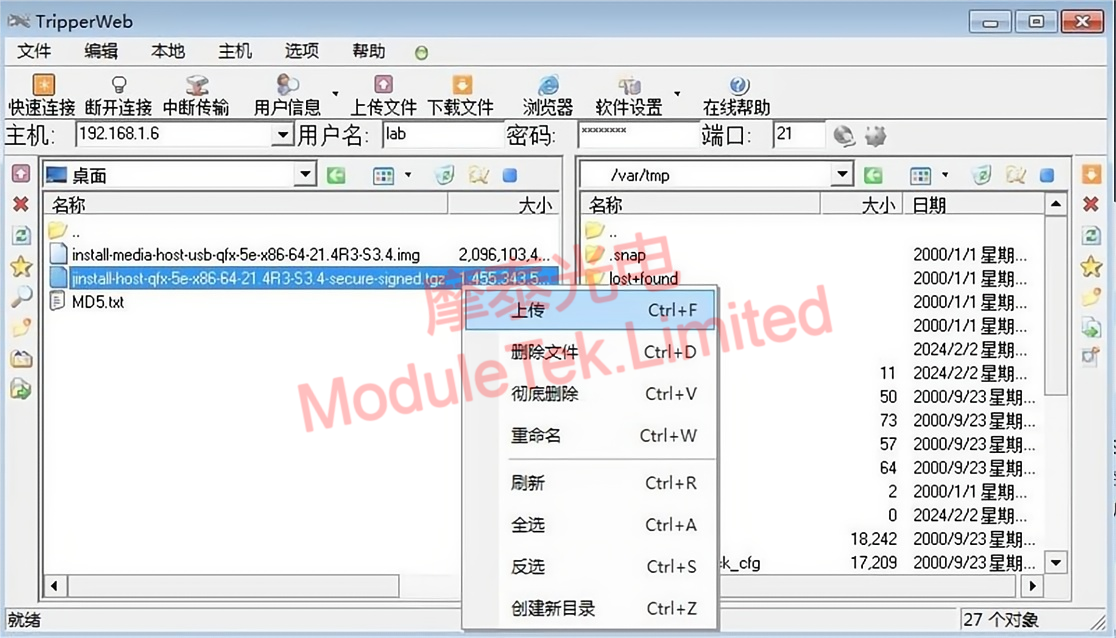
Figure 2 FTP File Transmission
4. After the upload is complete, check whether the system file exists in the switch directory on the FTP server and verify the file size is correct to avoid incomplete upload caused by insufficient disk space.
5. Add the firmware package to the switch system, and the switch will automatically decompress and install it.
6. Reboot the switch using the corresponding command to complete the system upgrade.
7. After the switch starts successfully, check the switch’s running system software version to confirm the upgrade is successful.
Moduletek provides optical transceivers fully compatible with Juniper switches. Welcome to inquire and purchase.
For further inquiries about the above content, please contact us at: sales@moduletek.com






