
 40G/100G Optical Transceivers
 25G Optical Transceivers
 10G Optical Transceivers
 155M/2.5G Optical Transceivers
 1G Optical Transceivers
 1G BIDI Optical Transceivers
 Dual-Rate Optical Transceivers
 FC 16G/32G Optical Transceivers
 CWDM Optical Transceivers
 DWDM Optical Transceivers
 SGMII Port Optical Transceivers
 XFP Optical Transceivers
 100M/1G/10G Coppers
 Full-Rate AOC & Breakout Series
 10G/40G Active DAC Series
 Full-Rate Passive DAC Series
 40G/100G Passive Breakout DAC Series
 Regular/MTP-MPO Fiber Patch Cords
 MT2011
 MT2010
 CodingBox
 QSFP to SFP Adapter
Brief Introduction To iperf3 Bandwidth Test Parameters
Time: 2024-06-24
1. Overview of iperf3
iperf3 is a widely used network performance testing tool. It supports configuration of timing duration, data buffers and multiple protocols including TCP, UDP, SCTP, IPv4 and IPv6, and is used to measure network link performance indicators such as transmission bandwidth, latency jitter and packet loss.
2. iperf3 Software Installation
Official download link: https://iperf.fr/iperf-download.php
This package is applicable to CentOS 64-bit system, file name: iperf3-3.1.3-1.fc24.x86_64.rpm
Run the following command in the server terminal to install iperf3:
rpm -ivh [filename]
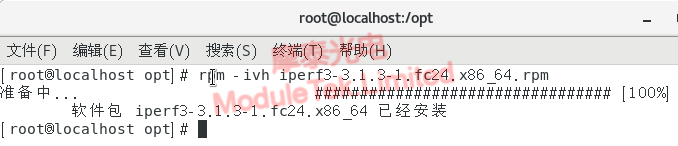
Figure 1 iPerf3 Software Installation
3. iperf3 Command Parameter Instructions
After installation, execute iperf3 -h to view full usage help.
iperf3 parameters are divided into three categories: server exclusive parameters, client exclusive parameters, and common parameters for both ends. Common options are explained as follows.
Table 1 Server Exclusive Parameters
| Parameters | Description |
| -D | Run iperf3 as background daemon. Example: iperf3 -s -D |
| -S | Start iperf3 in server listening mode. Default port: 5201, adjustable via -p |
Table 2 Client Exclusive Parameters
| Parameters | Description |
| -c | Start client mode, followed by server IP. Example: iperf3 -c 192.168.12.168 |
| -u | Adopt UDP transmission protocol |
| -b [K|M|G] | Limit UDP test bandwidth, unit: bits/sec. Matches -u, default: 1 Mbit/sec |
| -t | Set continuous test time, default duration: 10 seconds |
| -n [K|M|G] | Specify total transmission bytes. Example: iperf3 -c 192.168.12.168 -n 100M |
| -I | Set test packet buffer length. TCP default: 8KB, UDP default: 1470 bytes |
| -P | Set concurrent threads, must be identical on client and server, default: 1 thread |
| -R | Reverse traffic direction: server transmits data while client receives data |
| -W | Set socket buffer size. TCP = sliding window; UDP = maximum receivable packet capacity |
| -B | Bind specified IP or network interface for multi-NIC devices; support UDP multicast binding |
| -M | Configure TCP Maximum Segment Size (MSS) |
| -N | Enable TCP no-delay transmission |
Table 3 Common Parameters for Server & Client
|
Parameters
|
Description
|
|
-f
|
Select bandwidth output unit: k/m/g/K/M/G = Kbits/Mbits/Gbits/KBytes/MBytes/GBytes, default: Mbits
Example: iperf3 -c 192.168.12.168 -f M
|
|
-p
|
Unify listening & connection port on both ends
Example: iperf3 -s -p 9527 / iperf3 -c 192.168.12.168 -p 9527
|
Optical transceivers operate at the physical layer on servers, realizing transparent photoelectric conversion and transmission of binary signals, and will not cause abnormal bandwidth fluctuations in normal iperf3 tests.
When performing iPerf3 traffic tests with optical transceivers, you may follow the parameter descriptions in the tables above to enter test commands. For detailed steps of port and traffic testing on servers, please refer to the article : Introduction To Iperf3 Bandwidth Test on our official website.
For further inquiries about the above content, please contact us at: sales@moduletek.com






