
 40G/100G Optical Transceivers
 25G Optical Transceivers
 10G Optical Transceivers
 155M/2.5G Optical Transceivers
 1G Optical Transceivers
 1G BIDI Optical Transceivers
 Dual-Rate Optical Transceivers
 FC 16G/32G Optical Transceivers
 CWDM Optical Transceivers
 DWDM Optical Transceivers
 SGMII Port Optical Transceivers
 XFP Optical Transceivers
 100M/1G/10G Coppers
 Full-Rate AOC & Breakout Series
 10G/40G Active DAC Series
 Full-Rate Passive DAC Series
 40G/100G Passive Breakout DAC Series
 Regular/MTP-MPO Fiber Patch Cords
 MT2011
 MT2010
 CodingBox
 QSFP to SFP Adapter
 首页 > Home > Application Notes > Moduletek 10G Copper Cable: Perfectly Supports Cisco Fabric Extender (FEX) Extensions
Moduletek 10G Copper Cable: Perfectly Supports Cisco Fabric Extender (FEX) Extensions
Time: 2021-11-09
I. Introduction to Cisco Fabric Extender (FEX)
Cisco Fabric Extender (FEX), also known as a switch matrix extender, provides a scalable and flexible network architecture. With the soaring demand for user data services, the density of servers in data center rooms is increasing rapidly. Emerging technology trends such as virtualization and cloud computing have led to a sharp rise in the number of network ports corresponding to servers, increasing management complexity. In addition, the convergence of Ethernet (LAN) and fiber-optic Storage Area Networks (SANs) has become increasingly common, necessitating a new network topology.
Cloud computing has driven the adoption of distributed architectures with high scalability, requiring a growing number of servers. For example, the new Apache Hadoop 0.23 supports clusters of 6,000 to 10,000 servers. Such a large number of servers demands full utilization of data center cabinet space, while massive business data requires faster, more direct high-performance links to transmit data to the network core. Under this trend, FEX effectively addresses the drawbacks of TOR (Top of Rack) and EOR (End of Row) architectures: TOR reduces the number of LAN management devices, while EOR minimizes cabling hassles.
II. Environment Setup
• 1 unit of Cisco N2K switch;
• 1 unit of Cisco N5K switch;
• 1 piece of 10G rate, 3-meter copper cable (Moduletek product model: DAC-SFP10-P-M-30AWG-003.00M).
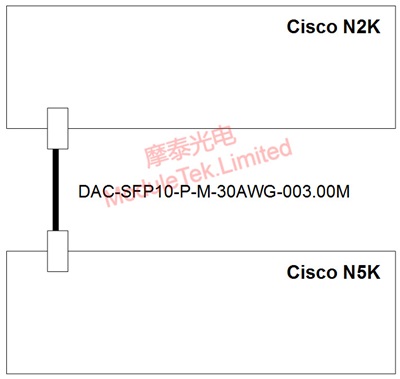
Figure 1 Environment Setup Diagram
III. FEX Function Configuration
Step 1: Create FEX and Configure Port Quantity
Switch N5k # configure terminal
Switch N5k(config)# fex 100 # Create FEX 100 (ID range: 100-199)
Switch N5k(config)# pinning max-links 1 # Configure number of links (range: 1-4; 1=48 ports used, 2=24 ports used, 3=16 ports used, 4=12 ports used)
Step 2: Port Configuration
Switch N5k # configure terminal
Switch N5k(config)# interface ethernet 1/1
Switch N5k(config-if)# switchport mode fex-fabric # Set port mode to FEX fabric
Switch N5k(config-if)# fex associate 100 # Assign port to FEX 100
Step 3: Verify Configuration
View the switch status:
The N2K switch ports will be visible and manageable on the N5K switch, indicating successful configuration.
IV. Traffic Verification Test
A 20-minute traffic test was conducted, with no error codes detected. This confirms that Moduletek's 10G copper cable is perfectly compatible with Cisco Fabric Extender. Additionally, other Moduletek 10G optical modules can also be applied in this scenario.
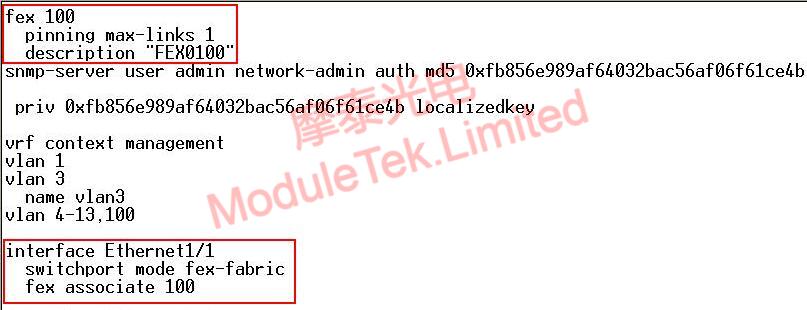
Figure 2 Traffic Verification Test Experimental Environment

Figure 3 Traffic Verification Test Results
Moduletek Limited is at your service.
For further inquiries about the above content, please contact us at: sales@moduletek.com






