
 40G/100G Optical Transceivers
 25G Optical Transceivers
 10G Optical Transceivers
 155M/2.5G Optical Transceivers
 1G Optical Transceivers
 1G BIDI Optical Transceivers
 Dual-Rate Optical Transceivers
 FC 16G/32G Optical Transceivers
 CWDM Optical Transceivers
 DWDM Optical Transceivers
 SGMII Port Optical Transceivers
 XFP Optical Transceivers
 100M/1G/10G Coppers
 Full-Rate AOC & Breakout Series
 10G/40G Active DAC Series
 Full-Rate Passive DAC Series
 40G/100G Passive Breakout DAC Series
 Regular/MTP-MPO Fiber Patch Cords
 MT2011
 MT2010
 CodingBox
 QSFP to SFP Adapter
Introduction To Iperf3 Bandwidth Test
Time: 2024-03-13
1. Overview of iperf3
iperf3 is a commonly used network performance testing tool. It supports various parameters related to timing, buffer settings, and protocols (TCP, UDP, SCTP, IPv4 and IPv6), and is used to evaluate core network link performance indicators such as transmission bandwidth, latency jitter, and packet loss.
2. iperf3 Test Environment
Test equipment: 2 servers; 2 network interface cards (NICs); 2 optical transceivers; 1 dual-fiber patch cord.
Connect the devices according to the following network topology diagram:
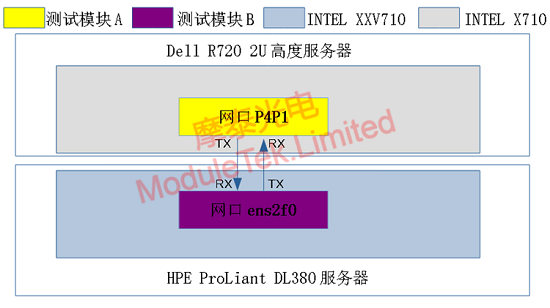
Figure 1 Simple iperf3 Test Topology
3. iperf3 Testing Software
Download address: https://iperf.fr/iperf-download.php
For this test, we select the 64-bit CentOS version, and the downloaded file is named iperf3-3.1.3-1.fc24.x86_64.rpm.
Enter the command rpm -ivh [file name] in the server terminal to install the iperf tool.
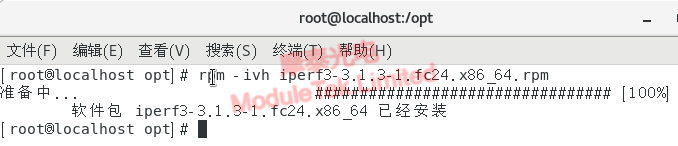
Figure 2 iperf3 Software Installation
4. iperf3 Test Procedure
a. Insert one optical transceiver into port p4p1 of the Intel XXV710 NIC on a Dell R720 2U server, and insert the other transceiver into port ens2f0 of the Intel X710 NIC on an HPE ProLiant DL380 server. Connect the two servers back-to-back with a short patch cord. After the NIC link status is up (steady LED light), open the terminals of both servers.
b. Open the terminal on the Dell R720 2U server, configure the IP address of port p4p1 as 7.7.7.7 with a subnet mask of 255.255.255.0, and verify the configuration.
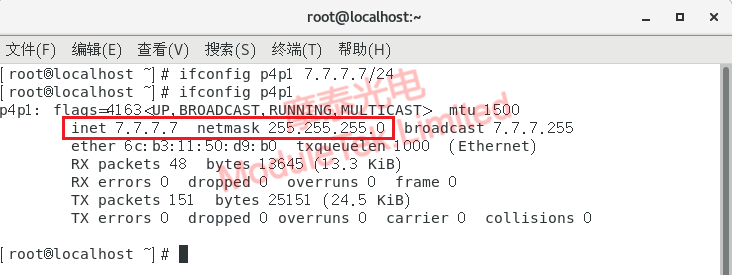
Figure 3 iperf3 IP Configuration for p4p1
c. Open the terminal on the HPE ProLiant DL380 server, configure the IP address of port ens2f0 as 7.7.7.8 with a subnet mask of 255.255.255.0, and verify the configuration.
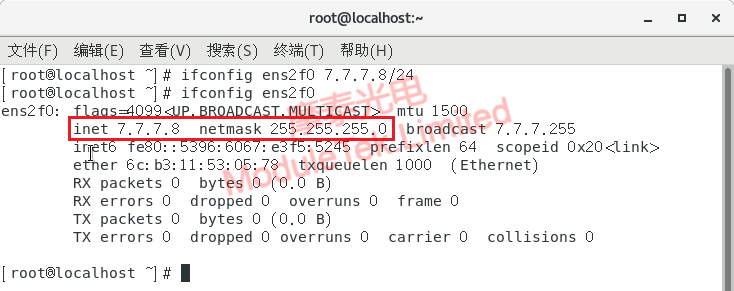
Figure 4 iperf3 IP Configuration for ens2f0
d. Disable the firewall and restart the network management service to make the IP configuration take effect.

Figure 5 Restart Service to Activate IP Configuration
e. Run the iperf3 server on the Dell R720 2U server.
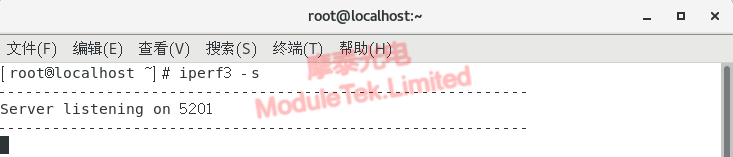
Figure 6 Running the iperf3 Server
f. Run the iperf3 client on the HPE ProLiant DL380 server, and observe the traffic/bandwidth test results as shown in the figure below.
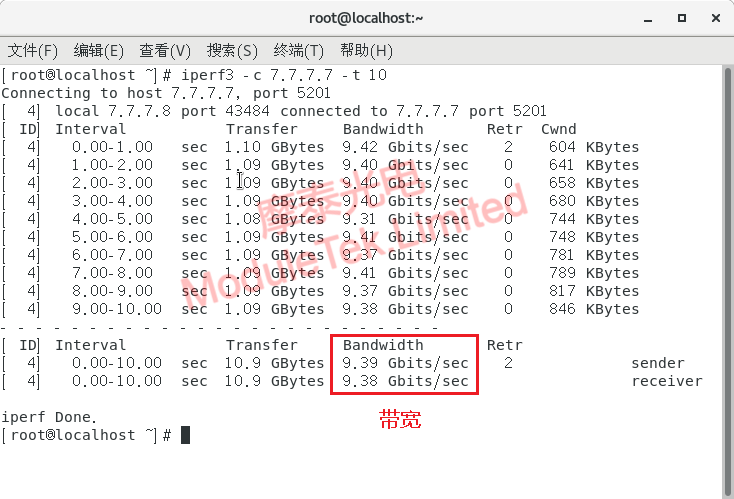
Figure 7 Bandwidth Test of SFP-10G-SR-C-D11 Transceiver on NIC
When optical transceivers are used in servers, they operate at the physical layer, performing transparent photoelectric conversion and transmission of binary "0" and "1" signals. They generally do not cause fluctuations in bandwidth during iperf3 tests.
Due to CPU hardware limitations, the actual bandwidth measured in iperf3 traffic tests using optical transceivers usually cannot reach 100% of the rated bandwidth. As shown in Figure 7 above, although the optical transceiver supports 10 Gbit/s bandwidth, only approximately 9.4 Gbit/s is achieved under the current server hardware conditions.
Moduletek sincerely serves you!
For further inquiries about the above content, please contact us at: sales@moduletek.com






