
 40G/100G Optical Transceivers
 25G Optical Transceivers
 10G Optical Transceivers
 155M/2.5G Optical Transceivers
 1G Optical Transceivers
 1G BIDI Optical Transceivers
 Dual-Rate Optical Transceivers
 FC 16G/32G Optical Transceivers
 CWDM Optical Transceivers
 DWDM Optical Transceivers
 SGMII Port Optical Transceivers
 XFP Optical Transceivers
 100M/1G/10G Coppers
 Full-Rate AOC & Breakout Series
 10G/40G Active DAC Series
 Full-Rate Passive DAC Series
 40G/100G Passive Breakout DAC Series
 Regular/MTP-MPO Fiber Patch Cords
 MT2011
 MT2010
 CodingBox
 QSFP to SFP Adapter
Unboxing of H3C S6812-24X6C Switch
Time: 2024-08-26
H3C S6813&6812 Series switches are data center-class Ethernet switches independently developed by H3C. They feature rich data center capabilities and provide flexible dynamic combinations of 40GE, 100GE and 10G ports for industry-leading compact switches, adapting to diverse data center networking scenarios.
Moduletek Laboratory purchased an H3C S6812-24X6C switch for subsequent compatibility testing of 1G/10G SFP+ and 40G/100G QSFP28 transceiver series. This document presents the complete unboxing and acceptance process as well as key details of the device.
Table 1 Official Device Specifications
| Model | Description |
| S6812-24X6C | S6812-24X6C 24 1/10GE SFP+ ports, 6 40/100GE QSFP28 ports, dual pluggable power supplies, triple pluggable fans |
1. Device Packaging and Accessory Inventory
Both the outer packaging box and the sealing tape are printed with a clear H3C logo. A complete product information label (including key parameters such as model and specifications) is pasted on the side of the box, and the packaging is intact without damage or stains. After unboxing, the items are neatly arranged, including the following standard accessories, intact and undamaged:
1x Switch host (power modules and fan modules not included, sold separately);
1x Accessory package (including rack-mounting screws and brackets);
1x Grounding wire;
1x Product installation guide.
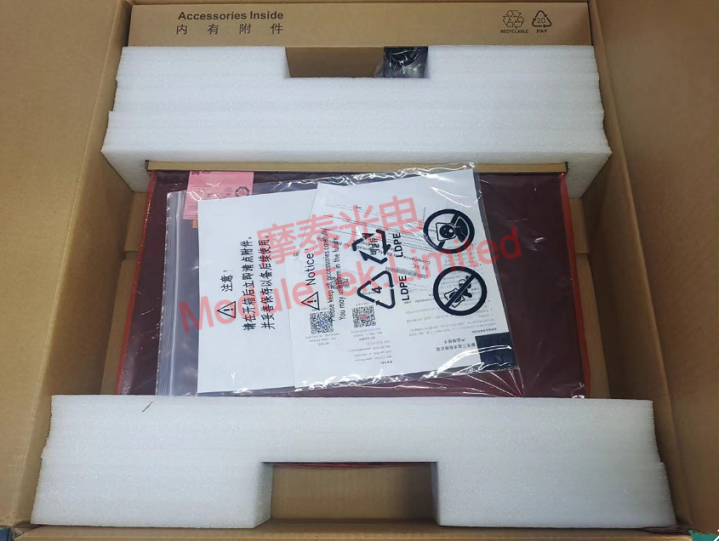
Figure 1 Inner Packaging
2. Device Panel Details
Front Panel
It is mainly equipped with 24x 1/10GE SFP+ ports (for 1G/10G optical transceivers) and 6x 40/100GE QSFP28 ports (for 40G/100G optical transceivers). The interfaces are clearly marked and reasonably laid out, facilitating daily deployment and maintenance.
Rear Panel
It is mainly equipped with: 2x external power supply slots and 3x external fan slots (both support hot swapping, compatible with optional modules); 1x RJ45 serial port and 1x RJ45 external management port (for device console connection and operation management); 1x Reset button (for quickly restoring the device to factory settings); 1x USB-A port (for file interaction with the switch's Flash file system, such as firmware upgrade and configuration import/export).
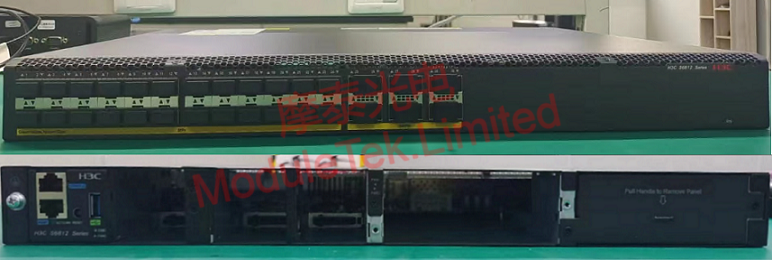
Figure 2 Front/Rear Panel
3. Device Power-On Test
After connecting the optional external power modules and fan modules to the switch, turn on the device power. The device starts stably without obvious noise or abnormal heating, the indicator lights are on normally, and the startup status fully meets the official standards with normal device initialization.
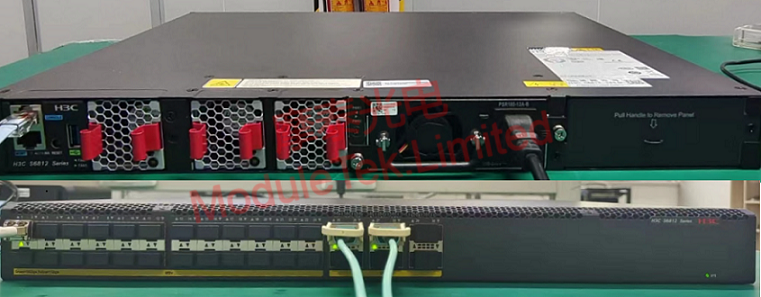
Figure 3 Power-On Status
4. Console Login and Transceiver Compatibility Test
Console Login: Use an RJ45-to-DB9 serial cable to connect the computer to the switch serial port. The default baud rate of the device is 9600, and the initial login account/password is blank. After successfully logging in to the console, run the command display version to view the device running system version information with timely and normal command response.
Transceiver Compatibility Test: Insert Moduletek 100G SR4 transceiver (compatible with H3C QSFP-100G-SR-MM850) into the QSFP28 port of the switch. The device can quickly identify the transceiver type without alarms or identification abnormalities, with good adaptability.
Interface Rate Configuration: After entering the interface configuration mode, the interface rate mode can be modified according to actual networking needs. The device defaults to automatic rate mode, which can flexibly adapt to the use of transceivers with different rates.
All series of Moduletek optical transceivers are well compatible with various H3C network devices, featuring stable performance and strong adaptability. Welcome to consult and purchase.
For further inquiries about the above content, please contact us at: sales@moduletek.com






