
 40G/100G Optical Transceivers
 25G Optical Transceivers
 10G Optical Transceivers
 155M/2.5G Optical Transceivers
 1G Optical Transceivers
 1G BIDI Optical Transceivers
 Dual-Rate Optical Transceivers
 FC 16G/32G Optical Transceivers
 CWDM Optical Transceivers
 DWDM Optical Transceivers
 SGMII Port Optical Transceivers
 XFP Optical Transceivers
 100M/1G/10G Coppers
 Full-Rate AOC & Breakout Series
 10G/40G Active DAC Series
 Full-Rate Passive DAC Series
 40G/100G Passive Breakout DAC Series
 Regular/MTP-MPO Fiber Patch Cords
 MT2011
 MT2010
 CodingBox
 QSFP to SFP Adapter
What Is Optical Module Coding Compatibility?
Time: 2020-02-23
Optical module coding can be regarded as a key to match a switch, which is like a large lock. There are numerous switch brands, such as Cisco, Huawei, H3C, Juniper, and Alcatel. When purchasing optical modules, users need to specify the target switch brand and model. However, in practical applications, if you intend to use an optical module on a different target switch, you may need to modify the corresponding coding according to the actual situation to ensure its normal operation.
Let us briefly understand optical module coding as follows:
1. Reference Protocol Standards
Different optical module coding protocols can refer to the corresponding MSA (Multi-Source Agreement):
• SFP form factor corresponds to SFF-8472
• XFP form factor corresponds to INF-8077
• QSFP form factor corresponds to SFF-8636
2. Coding Areas
Taking the SFP form factor as an example, coding data is stored in the A0h area and the page 00h/01h areas of A2h.
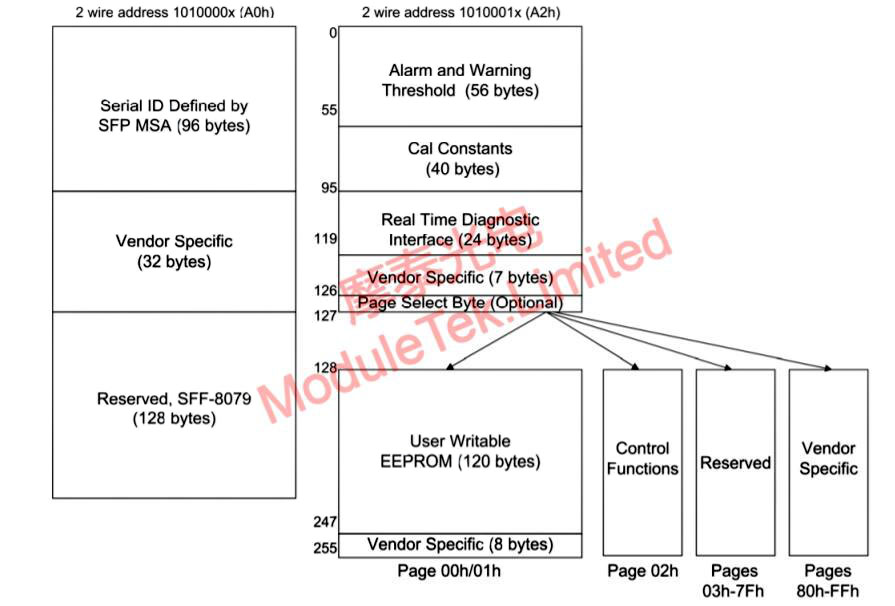
Figure 1 SFP Data Storage Structure
Taking the XFP form factor as an example, coding data is stored in Table 01h and Table 02h of the A0h area.
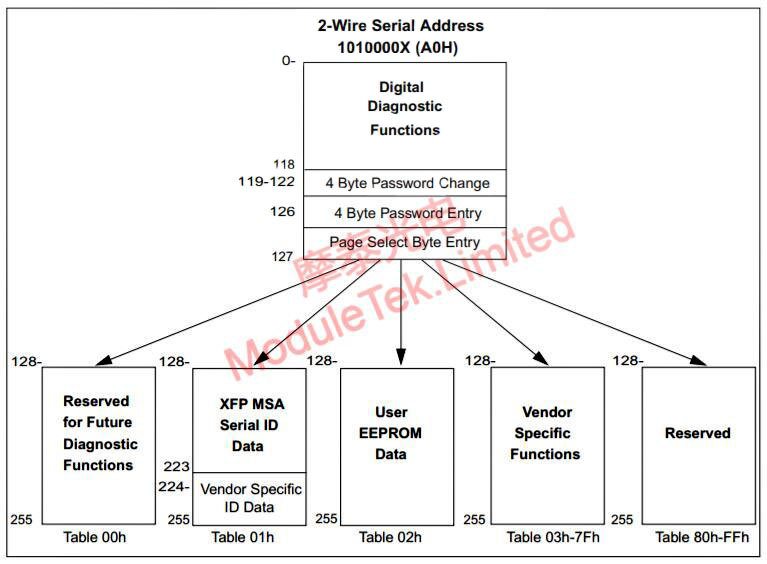
Figure 2 XFP Data Storage Structure
Switches of different brands have slightly different definitions for the content in these coding areas. Manufacturers can implement various customized restrictions in these areas to identify module types or prevent the use of third-party modules. This is what we call coding compatibility. If the coding of an optical module fails to meet the requirements of the switch, the module may fail to work properly or trigger device alarms. For instance, Cisco switches implement complex algorithm verification in these coding areas. If the used optical module does not comply with Cisco's coding rules, the switch will disable the corresponding port by default to prevent the module from operating normally. After inserting a third-party module, Huawei switches will generate system warning messages in the system by default, but usually will not prohibit the use of the module. These switches generally provide system configuration commands to disable the third-party module automatic checking function, facilitating users to use third-party optical module products.
Moduletek has independently developed the CodingBox Programmer, which supports SFP/XFP/QSFP modules simultaneously. Users can modify the coding by themselves as needed to adapt to different switch applications. The CodingBox Programmer is flexible and portable. It requires no independent power supply or driver installation, and supports plug-and-play on the Windows 10 system, with user-friendly operation.
To achieve plug-and-play functionality, we have designed the CodingBox to be connected to a computer's USB port. You can easily use it by connecting the CodingBox to your computer with a USB cable. Welcome to place your orders!
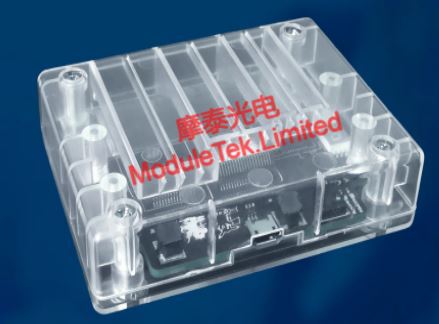
Figure 3 CodingBox Appearance
For further inquiries about the above content, please contact us at: sales@moduletek.com






