
 40G/100G Optical Transceivers
 25G Optical Transceivers
 10G Optical Transceivers
 155M/2.5G Optical Transceivers
 1G Optical Transceivers
 1G BIDI Optical Transceivers
 Dual-Rate Optical Transceivers
 FC 16G/32G Optical Transceivers
 CWDM Optical Transceivers
 DWDM Optical Transceivers
 SGMII Port Optical Transceivers
 XFP Optical Transceivers
 100M/1G/10G Coppers
 Full-Rate AOC & Breakout Series
 10G/40G Active DAC Series
 Full-Rate Passive DAC Series
 40G/100G Passive Breakout DAC Series
 Regular/MTP-MPO Fiber Patch Cords
 MT2011
 MT2010
 CodingBox
 QSFP to SFP Adapter
Introduction To Switch Port FEC Mode Parameters
Time: 2023-12-06
We have previously covered how to configure and verify FEC modes on switch ports, and noted that FEC functionality is established through negotiation between both ends of a link (for details, please refer to How To Configure Switch Interface FEC Mode.
Multiple FEC modes are available, and different switch brands or models provide different FEC options with inconsistent naming. This frequently causes confusion and misconfiguration when optical modules are connected to equipment from different vendors. To clarify these differences, we summarize and explain the FEC mode parameters offered by mainstream switch manufacturers.
Moduletek has tested and compiled the FEC configuration methods and corresponding command parameters for 25G/100G switch ports from major vendors, as shown below:
Table 1 FEC Configuration Commands and Parameters for 25G/100G Switch Ports (Mainstream Vendors)
| Brand | CISCO | HUAWEI | RUIJIE | BROCADE |
| Models | C9300-24T-E | CE8600-48S8CQ-EI | RG-S6510-48VS8CQ | SLX9140 |
| Software Version | IOS XE 16.12.01 | 8.15 | S6500_RGOS 11.0(5)B9P58S3 | 17s.1.00 |
| FEC Optional Parameters |
C9300-24T# configure terminal C9300-24T(config)# int twentyFiveGigE 1 1/1/1 C9300-24T(config-if)#fec ? auto Enable FEC Auto-Neg cl108 Enable clause108 with 25G cl74 Enable clause74 with 25G cl91 Enable clause91 with 100G off Turn FEC off |
<HUAWEI>system-view [~HUAWEl]interface 25GE 1/0/17 [~HUAWEI-25GE1/0/17] fec mode ? base-r Base-r none None enable rs Reed-Solomon |
Rujie # configure terminal Rujie(config)= int tfGigabitEthernet 0/13i Rujie(config-if-TFGigabitEthernet 0/13)# fec mode ? auto Set fec mode auto base-r Set fec mode base-r none Set fec mode none rs Set fec mode rs |
SLX # configure terminal SLX(config)#interface Ethernet 0/51 SLX(conf-if-eth-0/51)# fec mode ? FC-FEC Set FEC mode to FC - FEC in manual mode RS-FEC Set FEC mode to RS- FEC in manual mode auto-negotation Set FEC auto negotiation on disable Set FEC disable |
| Brand | DELL | H3C | MELLANOX | EXTREME |
| Models | S5224F-ON | S6850-56HF | SN2410 | X690-48x-2q-4c |
| Software Version | OS10.4.3E | 7.1.070, Release 6635 | MLNX - OS 3.6.4114 | ExtremeXOS 22.4.1.4 |
| FEC Optional Parameters |
OS10# configure terminal OS10(config)# interface ethernet1/1/5 OS10(conf-if-eth1/1/5)# fec ? CL74-FC CL74 FEC CL91-RS CL91 FEC CL108-RS CL108 FEC off Disable FEC |
<H3C>system-view [H3C]int TwentyFiveGigE1/0/34 [H3C-Twenty-FiveGigE1/0/34]port fec mode ? auto Enable FEC autonegotiation base-r Enable BASE-R FEC none Disable FEC rs-fec Enable Reed-Solomon FEC |
mellanox # configure terminal mellanox(config)# int eth 1/10 mellanox(config interface ethernet 1/10)# fec-override ? no-fec don't use FEC fc-fec FireCode FEC rs-fec Reed Solomon FEC |
X690-48x-2q-4c.10# configure ports 57 forward-error-correction ? off Disable forward error correction ( Default ) on Enable forward error correction ( FEC ) X690-48x-2q-4c.10# configure ports 57 forward-error-correction on ? Cl74 Enable forward error correction IEEE clause 74 CI91 Enable forward error correction IEEE clause 91 |
| Brand | CENTEC | HPE | JUNIPER | ARISTA |
| Models | E580 | FF 594048SFP-6QSFP28 | QFX5200-48Y | DCS -7160-48YC6 |
| Software Version | CentecOS 6.2.24 | 7.1.070, Release 6710 | Junos :20.2R2-53 | 4.26.2F |
| FEC Optional Parameters |
Switch# configure terminal Switch(config)# interface eth-0-9 Switch(config-if)# fec ? disable Disable FEC enable Enable FEC |
<HPE>system-vew [HPE]int HundredGigE1/0/52 [HPE-HundredGigE1/0/52]port fec mode ? auto Enable FEC autonegotiation none Disable FEC rs-fec Enable Reed-Solomon FEC |
root @QFX5200# st interfaces et -0/0/19 gigether - options fec ? Possible completions : Fec74 FEC74 enabled fec91 IEEE 8023bj Clause 91, Reed - Solomon FEC(RS - FEC) none FEC disabled |
localhost# configure terminal locahost(config)# interface ethernet49/1 localhost(config-if-Et49/1)# error-correction encoding ? fire-code Configure Fire code(BASE-R)forward error correction reed-solomon Confgure Reed-Solomon(RS-FEC)forward error correction |
1. BASE-R FEC
Defined in IEEE 802.3 Clause 74 (BASE-R PHY), it is also known as FC-FEC, Firecode FEC, CL74, FEC74, CL74-FC, etc.
2. RS-FEC
RS-FEC falls into two categories:
• For 100G applications: Defined in IEEE 802.3 Clause 91 (100GBASE-R PHY), also referred to as Reed-Solomon FEC, RS, CL91, FEC91, CL91-RS, etc.
• For 25G applications: Defined in IEEE 802.3 Clause 108 (25GBASE-R PHY), also referred to as Reed-Solomon FEC, RS, CL108, FEC108, CL108-RS, etc.
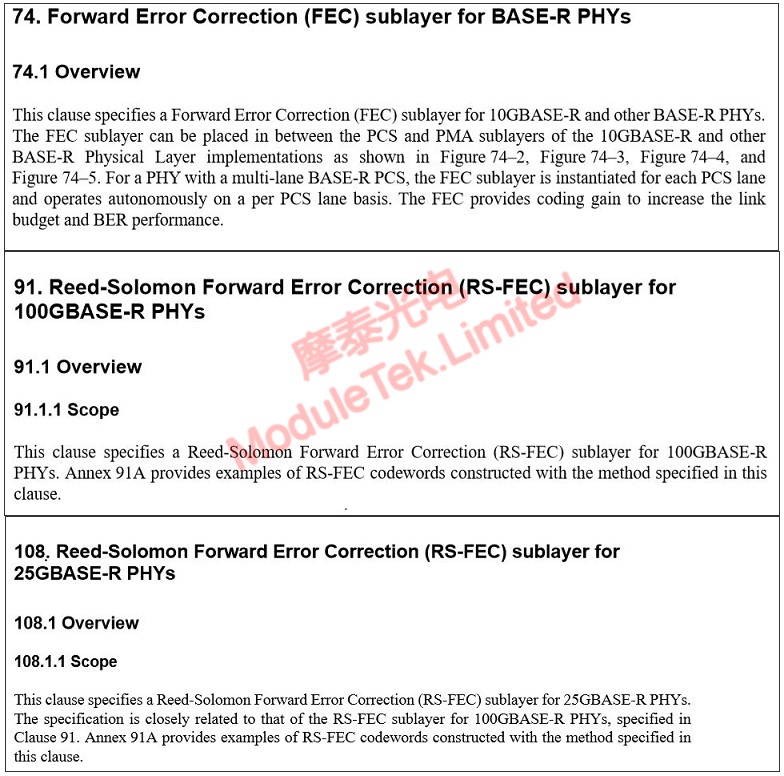
Figure 1 Intercept from the relevant section of IEEE Std 802.3
Notes:
1. Some models (e.g., Huawei CE6860) only show the FEC configuration command after an optical module is installed. The command will be unavailable if no module is present.
2. Some devices (e.g., Juniper QFX5200) allow configuring unsupported FEC modes without warning, but such settings may not take effect. Always check the actual running FEC mode in the port status.
3. Configurable FEC modes depend on the optical module type, and vendor requirements for the same module may differ. Ensure the FEC mode is consistent at both ends of the link when connecting to different switches.
Moduletek Limited is at your service.
For further inquiries about the above content, please contact us at: sales@moduletek.com






